> ## Documentation Index
> Fetch the complete documentation index at: https://docs.commert.com/llms.txt
> Use this file to discover all available pages before exploring further.
# Wallet Overview in Commert Admin
Commert’s wallet is a prepaid credit balance that pays for platform charges and services. Every store has a wallet; keep it funded so orders, payouts, and other services continue without pauses.
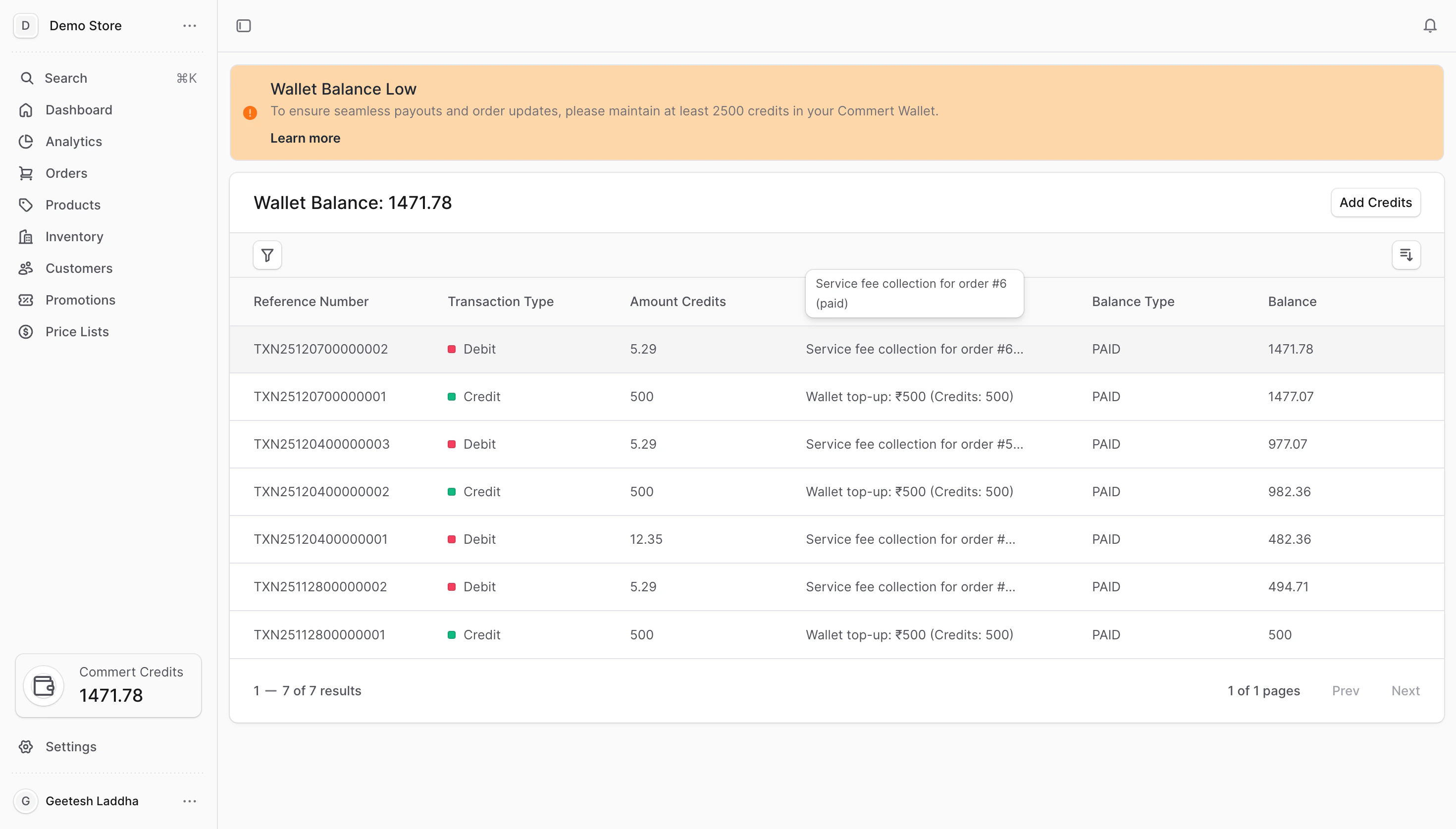 ## How credits work
* **1 credit = ₹1** (current setting). Credits are shown in the wallet card and on the Wallet page.
* **Paid credits vs. promotional credits**: Paid credits come from top-ups. Promotional credits come from promo codes or automatic grants and may have limits or expiry.
* **Usage**: Platform charges (like order fees) deduct from your wallet. Promotional credits are consumed first when allowed, then paid credits.
## When charges happen
* **Order fees**: A percentage of each order amount (based on your subscription plan) is debited as soon as the order is placed. Example: 3% plan + ₹100 order → 3 credits deducted.
* **Cancellations/returns**: If the order is cancelled or returned, the same percentage is credited back to your wallet.
* **Low balance**: If there are not enough credits, the platform places your services on hold until you top-up. Pending charges clear automatically after you add funds.
## What you can do in the Wallet
* **Check balance**: View paid and promotional balances and the total available credits.
* **Add credits**: Top-up via payment gateway or apply a promotional code.
* **Track history**: Review all wallet transactions with filters and sorting.
* **Resolve holds**: Clear service holds by adding credits; queued charges are paid off automatically.
Credits are prepaid and non-refundable. If your balance reaches zero, customer checkout and other features pause until you add credits.
***
## Next steps
* [Add Credits](./wallet/add-credits) — choose payment gateway or promo code.
* [View Transaction History](./wallet/transaction-history) — search, filter, and sort your wallet activity.
* [Service Holds](./wallet/service-holds) — learn what happens when the balance is low and how to clear holds.
## How credits work
* **1 credit = ₹1** (current setting). Credits are shown in the wallet card and on the Wallet page.
* **Paid credits vs. promotional credits**: Paid credits come from top-ups. Promotional credits come from promo codes or automatic grants and may have limits or expiry.
* **Usage**: Platform charges (like order fees) deduct from your wallet. Promotional credits are consumed first when allowed, then paid credits.
## When charges happen
* **Order fees**: A percentage of each order amount (based on your subscription plan) is debited as soon as the order is placed. Example: 3% plan + ₹100 order → 3 credits deducted.
* **Cancellations/returns**: If the order is cancelled or returned, the same percentage is credited back to your wallet.
* **Low balance**: If there are not enough credits, the platform places your services on hold until you top-up. Pending charges clear automatically after you add funds.
## What you can do in the Wallet
* **Check balance**: View paid and promotional balances and the total available credits.
* **Add credits**: Top-up via payment gateway or apply a promotional code.
* **Track history**: Review all wallet transactions with filters and sorting.
* **Resolve holds**: Clear service holds by adding credits; queued charges are paid off automatically.
Credits are prepaid and non-refundable. If your balance reaches zero, customer checkout and other features pause until you add credits.
***
## Next steps
* [Add Credits](./wallet/add-credits) — choose payment gateway or promo code.
* [View Transaction History](./wallet/transaction-history) — search, filter, and sort your wallet activity.
* [Service Holds](./wallet/service-holds) — learn what happens when the balance is low and how to clear holds.